
 020 7388 5619

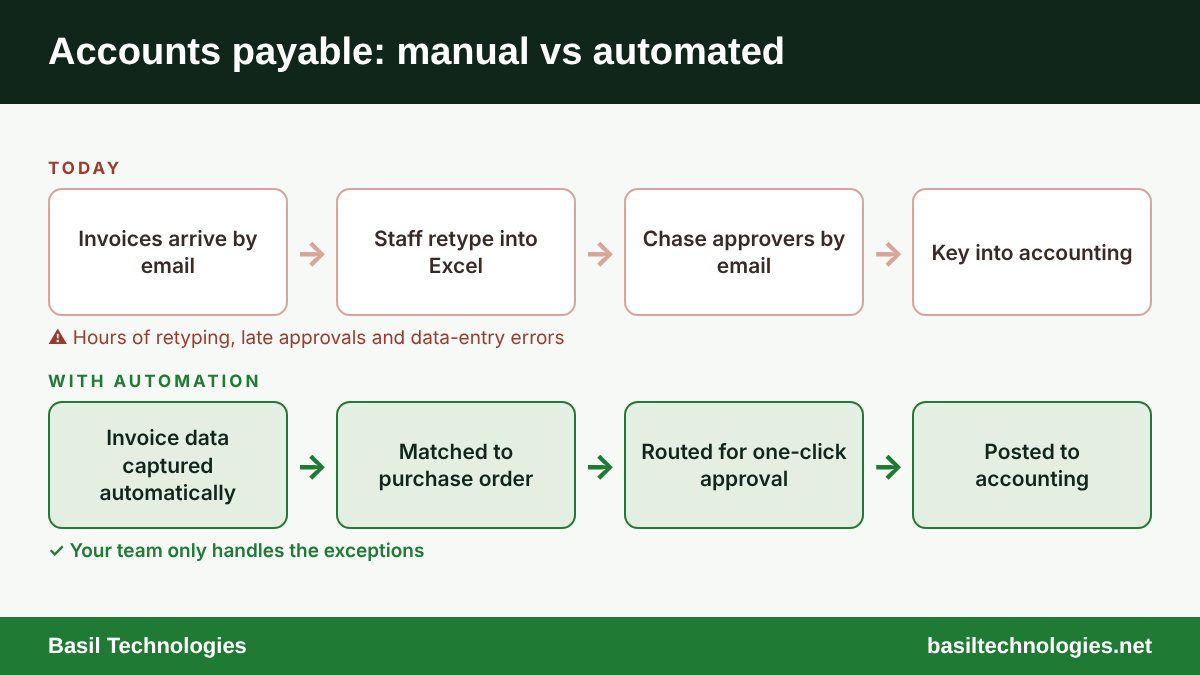
If your finance team spends more time typing, matching and chasing invoices than reviewing them, invoice automation in Singapore is the most direct fix. It captures invoice data automatically, routes it to the right approver, checks it against your purchase orders and posts it to your accounting system, so people only handle the exceptions. This article explains where accounts-payable (AP) time goes, what you can automate, and how an SME can start without disrupting month-end.
Where AP processing time actually goes
Most delays are not in the payment itself. They happen in the steps before it:
- Receiving invoices in many places. PDFs arrive in personal inboxes, WhatsApp messages, paper copies and supplier portals.
- Manual data entry. Someone retypes supplier name, invoice number, dates, GST and line items into the accounting system. This is slow and error-prone.
- Chasing approvals. The invoice sits with a department head who is travelling or does not know it arrived.
- Mismatches. The invoice does not match the purchase order or delivery note, and the back-and-forth begins.
- Duplicates and missing information. Suppliers resend invoices, and details like a PO number or GST registration number are missing.
Before buying any tool, time a sample of invoices from arrival to payment and note where each one waited. That tells you which step to fix first.
What invoice automation Singapore finance teams can realistically automate
Good invoice automation is a chain of small steps, each removing a manual task.
1. Capture and data extraction
Invoices from email, upload or e-invoice networks land in one place. Software reads the key fields (supplier, invoice number, date, amounts, tax, line items) so nobody retypes them. Accuracy varies by document quality and supplier format, so test with your own invoices rather than a vendor’s clean samples.
2. Validation and matching
The system checks for duplicates, missing fields and whether the invoice matches the purchase order or goods receipt (two-way or three-way matching). Clean matches pass through; the rest are flagged.
3. Approval workflows
Rules route each invoice to the right person by amount, department or supplier, with reminders and escalation if it sits too long. Approvers can act from email or a phone.
4. Posting and payment preparation
Approved invoices are posted to your accounting software with the right coding, and payment batches are prepared for your finance team to release.
5. Audit trail and reporting
Every action is logged, so you can see who approved what and when, and which invoices are overdue or about to incur late fees.
What changes day to day
Without automation, an invoice arrives in someone’s inbox, is printed or forwarded, keyed in, walked to an approver, queried, corrected and filed. With automation, it is captured on arrival, validated, routed and posted, and your team is notified only when something needs a decision.
The practical benefits are usually:
- Less time on data entry, so the team can focus on supplier queries and cash planning.
- Faster, more visible approvals, so fewer invoices go missing.
- Fewer duplicate or incorrect payments.
- A cleaner month-end close, because accruals and open invoices are easier to see.
- Better chances of paying on time, which helps supplier relationships and lets you use early-payment discounts where offered.
How much time you save depends on your invoice volume, supplier mix and how messy your current process is. Be wary of any vendor who promises a fixed percentage without looking at your workflow.
E-invoicing in Singapore and Malaysia: what to check
E-invoicing is moving the way invoices are exchanged. In Singapore, InvoiceNow is the national e-invoicing network built on the Peppol standard, which lets suppliers send structured invoices directly into a buyer’s system. In Malaysia, the LHDN e-Invoice (MyInvois) system is being phased in for businesses.
Requirements, thresholds and timelines change, so confirm the current rules with IRAS and IMDA in Singapore and LHDN in Malaysia, and with your accountant. When you evaluate any tool, ask whether it can receive structured e-invoices as well as read PDFs, so you are not rebuilding your process when more suppliers switch over.
How to start: a practical five-step plan
- Map your current process. Document how invoices arrive, who touches them and how long each stage takes.
- Pick your biggest bottleneck. For many SMEs it is data entry or approvals. Start there, not with everything at once.
- Clean up your supplier and PO data. Matching only works if supplier records and purchase orders are consistent.
- Pilot with a few suppliers or one department. Run it alongside the old process for a cycle or two and compare results.
- Integrate and expand. Connect to your accounting or ERP system, add suppliers, and refine approval rules based on what the exceptions show.
What to look for in an invoice automation solution
- Integration with your existing systems. Check your accounting software, ERP and bank file formats. A tool that needs double entry defeats the purpose.
- GST and multi-currency handling. Especially if you trade across Singapore and Malaysia.
- Flexible approval rules that match how your business actually works.
- Clear handling of exceptions. Ask what happens when extraction is wrong or an invoice is unusual.
- Data security and access controls, including who can see and approve what.
- Room to customise. Off-the-shelf tools suit standard workflows; if yours is unusual, you may need something tailored or extended.
FAQ
How long does it take to implement invoice automation?
It depends on how many systems you need to connect, how clean your supplier and PO data is, and how complex your approval rules are. A focused pilot is much quicker than a full rollout. Ask any provider for a phased plan so you see value early.
Is invoice automation only for large companies?
No. SMEs often benefit because a small finance team has little spare capacity. If your team regularly spends days each month on data entry and chasing approvals, automation is worth assessing, whatever your size.
Will it work with our existing accounting software?
Often yes, but it depends on the software and how it exposes data. Confirm integration options during evaluation and test with real invoices before committing.
Invoice automation works best when it is matched to your actual workflow, not a generic template. Basil Technologies, a Singapore software company since 2017, builds invoice automation as well as payslip automation, HRMS and custom integrations for SMEs and mid-size businesses in Singapore and Malaysia. Book a free consultation with Basil Technologies at https://basiltechnologies.net or email sales@basiltechnologies.net
